logo
✕
  • Home
  • Products
  • About Us
  • Contact
logo
  • Home
  • Products

    USB-C Cable

    • USB 4.0
    • USB 3.2
    • USB 3.0
    • USB 2.0

    Thunderbolt 5/4/3 Cable

    • Thunderbolt 5 Cable
    • Thunderbolt 4 Cable
    • Thunderbolt 3 Cable

    Audio/video Adapter Cable

    • DisplayPort To HDMI Cable
    • HDMI To DispalyPort Cable
    • HDMI To USB-C Cable
    • USB-C To DisplayPort Cable
    • USB-C To HDMI Cable

    USB-C Adapter

    • USB 4.0
    • USB 3.2
    • USB 3.0
    • USB 2.0
  • About Us
  • Contact
Published by eadmin on 2026-04-25
Categories
  • Blog
Tags

USB-C to HDMI Cable Complete Guide 2026: How to Connect Monitors, TVs, and Projectors

The demand for USB-C to HDMI connectivity has surged dramatically as laptops, tablets, and smartphones increasingly rely on USB-C as their sole port. Whether you are connecting to a 4K monitor for productivity, a TV for presentations, or a projector for conference rooms, a quality USB-C to HDMI cable or adapter is essential. As a professional USB-C cable manufacturer, Eilinks Electronics has helped thousands of businesses deploy reliable display solutions. This comprehensive guide covers everything you need to know about USB-C to HDMI technology in 2026.

Understanding USB-C DisplayPort Alternate Mode

The magic behind USB-C to HDMI connectivity lies in a feature called DisplayPort Alternate Mode (DP Alt Mode). When a USB-C port supports DP Alt Mode, it can transmit native DisplayPort signals directly through the USB-C connector. A USB-C cable with the right internal wiring can then carry these signals to an HDMI output through an active conversion chip or adapter.

How DP Alt Mode Works

DP Alt Mode reconfigures the high-speed lanes inside a USB-C cable to carry DisplayPort video data instead of USB data. Here is the process:

  • The source device (laptop, phone) detects a connection to a display sink
  • The USB-C controller switches from USB data mode to DP Alt Mode
  • Video signals travel through the cable to an HDMI converter chip
  • The chip translates DisplayPort signals into HDMI output
  • The display receives the HDMI signal and renders the image

Not all USB-C ports support DP Alt Mode. Many budget smartphones and some Chromebooks only support USB data and charging through their USB-C ports, with no video output capability. Always check your device specifications before purchasing a USB-C to HDMI solution.

USB-C to HDMI Cable vs Adapter: Which Is Better?

There are two main approaches to connecting USB-C to HDMI, and each has distinct advantages depending on your use case.

Feature USB-C to HDMI Cable USB-C to HDMI Adapter
Setup Single cable, plug and play Requires separate HDMI cable
Portability Compact, easy to carry Bulkier, two-piece setup
Max Resolution Up to 4K@60Hz (with HDMI 2.1) Up to 8K@60Hz (premium adapters)
Price $8-$25 $15-$60
Reliability Good for moderate lengths Better for long cable runs
Multi-monitor Single display only Supports daisy chaining

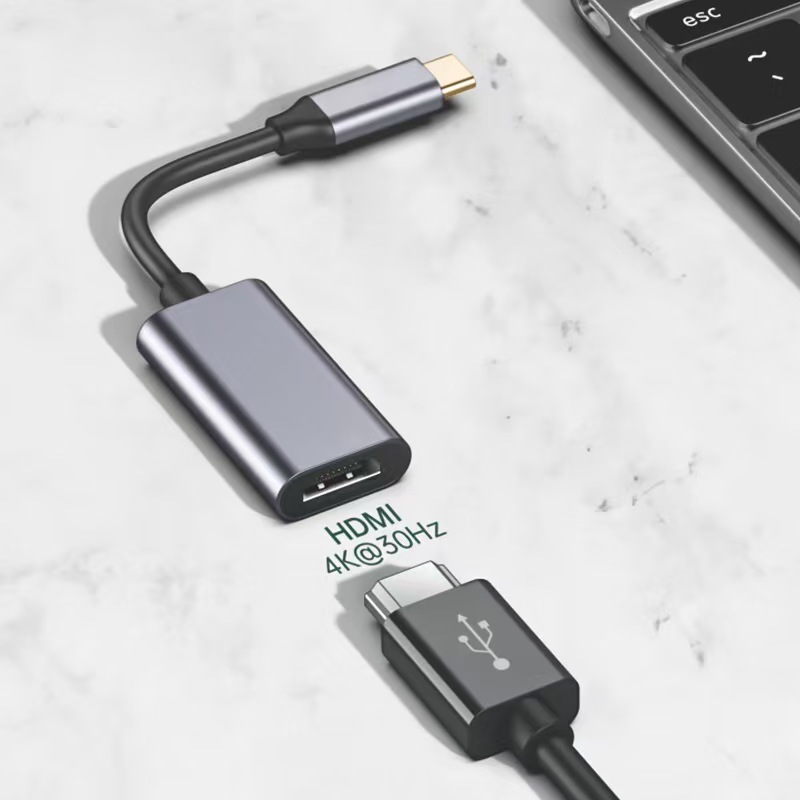
Eilinks Electronics manufactures both USB-C to HDMI cables and adapters, with options ranging from basic 1080p solutions to premium 4K@60Hz models. For most business and home office setups, a direct USB-C to HDMI cable offers the simplest and most cost-effective solution.

Resolution and Refresh Rate Support

The maximum resolution and refresh rate you can achieve depends on several factors: the USB-C version, the HDMI version, and the quality of the conversion chip inside the cable or adapter.

HDMI Version Capabilities

HDMI Version Max Resolution Max Refresh Rate Bandwidth Year Released
HDMI 1.4 4K 30Hz 10.2 Gbps 2009
HDMI 2.0 4K 60Hz 18 Gbps 2013
HDMI 2.1 8K 60Hz 48 Gbps 2017

For most users in 2026, HDMI 2.0 support delivering 4K at 60Hz is the sweet spot. HDMI 2.1 is worth the investment if you work with high refresh rate gaming monitors (144Hz at 1440p) or professional 8K displays. A high-quality USB4 cable with DP Alt Mode 2.0 can fully support HDMI 2.1 bandwidth requirements.

USB Bandwidth Requirements

The available bandwidth from your USB-C port directly impacts display quality:

  • USB 3.2 Gen 1 (5 Gbps): Sufficient for 1080p@60Hz or 4K@30Hz
  • USB 3.2 Gen 2 (10 Gbps): Supports 4K@60Hz with compression
  • USB4 (40 Gbps): Full 4K@60Hz uncompressed, or 8K@30Hz
  • Thunderbolt 4 (40 Gbps): Same as USB4 for display, plus dual 4K support

Devices equipped with a Thunderbolt 4 cable port or USB4 port deliver the best display experience, offering enough bandwidth for dual 4K monitors or a single 8K display through appropriate adapters.

Cable Length and Signal Integrity

Cable length is a critical factor for USB-C to HDMI performance. Unlike digital signals that simply work or do not, HDMI over USB-C can degrade gracefully, producing visual artifacts, color banding, or intermittent black screens when the cable is too long or poorly shielded.

Recommended Lengths

  • Up to 1 meter (3.3 ft): Full bandwidth, no issues with any resolution
  • 1-2 meters (3.3-6.6 ft): Good for 4K@60Hz with quality shielding
  • 2-3 meters (6.6-10 ft): May need active signal boost for 4K@60Hz
  • 3+ meters (10+ ft): Requires active optical cable or fiber HDMI for 4K

Eilinks Electronics uses high-purity oxygen-free copper conductors and triple-layer shielding in all USB-C to HDMI cables up to 2 meters, ensuring reliable 4K@60Hz performance. For longer runs, we offer active optical HDMI solutions that maintain signal integrity over distances up to 15 meters.

Choosing the Right USB-C to HDMI Cable for Your Device

Different devices have different USB-C port capabilities. Here is how to choose the right cable based on your source device:

MacBook Users

Apple MacBooks with USB-C/Thunderbolt ports support DP Alt Mode natively. A USB-C to HDMI cable with HDMI 2.0 support will deliver 4K@60Hz on MacBook Pro models from 2021 onwards. For M3 and M4 MacBook Pro models, a Thunderbolt 5 cable or Thunderbolt 4 cable adapter can drive even higher resolution displays.

Windows Laptop Users

Most Windows laptops from 2020 onwards with USB-C ports support DP Alt Mode. However, some gaming laptops use USB-C exclusively for data and charging, requiring a dedicated mini DisplayPort or HDMI output instead. Check your laptop manual or use the USB-IF certification database to confirm DP Alt Mode support.

Smartphone and Tablet Users

Flagship smartphones from Samsung, Google, and others support USB-C DisplayPort Alt Mode. A USB-C cable with HDMI output can turn your phone into a desktop workstation when connected to a monitor. Samsung DeX and similar desktop modes work best with HDMI 2.0 cables for smooth 1080p or 4K output.

Common Problems and Solutions

No Display Detected

If your monitor shows no signal when connected via USB-C to HDMI, try these steps:

  • Verify your USB-C port supports DP Alt Mode (check device specs)
  • Try a different USB-C port if your device has multiple ports
  • Check that the HDMI input on your display is correctly selected
  • Update your graphics drivers to the latest version
  • Test with a different monitor or TV to isolate the issue

Flickering or Artifacts

Visual artifacts usually indicate signal degradation:

  • Try a shorter cable length
  • Ensure the cable is properly seated in both ports
  • Reduce resolution or refresh rate settings
  • Check for electromagnetic interference from nearby power cables
  • Replace with a higher quality shielded cable from a trusted manufacturer

Audio Not Working Through HDMI

USB-C to HDMI cables should carry both video and audio. If you get video but no audio:

  • Set the HDMI output as the default audio device in your OS sound settings
  • Check that your display has built-in speakers
  • Update your display and graphics drivers
  • Try disconnecting and reconnecting the cable

USB-C to HDMI for Business and OEM Applications

For businesses deploying large numbers of workstations, conference rooms, or digital signage installations, choosing the right USB-C cable manufacturer is crucial. Eilinks Electronics offers:

  • OEM customization: Custom cable lengths, colors, and connector styles
  • Bulk pricing: Competitive rates for orders of 500+ units
  • Quality assurance: Every cable tested for HDMI compliance and signal integrity
  • Certification support: HDMI Adopter, USB-IF, and UL certification available
  • Fast turnaround: Standard production in 7-10 business days

Whether you need 100 conference room adapter kits or 10,000 custom-length USB-C to HDMI cables for a laptop fleet, Eilinks Electronics delivers reliable, certified solutions at competitive prices.

Frequently Asked Questions

Can any USB-C port output HDMI video?

No. Only USB-C ports that support DisplayPort Alternate Mode (DP Alt Mode) can output video signals. Many budget devices and some USB-C ports designated as “charging only” do not support video output. Always check your device specifications or contact the manufacturer to confirm DP Alt Mode support before purchasing a USB-C to HDMI cable.

What is the maximum resolution for USB-C to HDMI?

The maximum resolution depends on the USB-C port bandwidth and the HDMI version. With a USB4 or Thunderbolt 4 cable port and an HDMI 2.1 adapter, you can achieve up to 8K@60Hz. With HDMI 2.0, the maximum is 4K@60Hz. Standard DP Alt Mode over USB 3.2 typically supports up to 4K@30Hz or 1080p@60Hz.

Do I need drivers for a USB-C to HDMI cable?

In most cases, no additional drivers are needed. USB-C to HDMI cables with built-in conversion chips use generic DisplayPort and HDMI drivers that are included with Windows, macOS, and Chrome OS. However, some premium adapters with advanced features like multi-monitor support or high refresh rates may include optional driver software for enhanced functionality.

Can I use USB-C to HDMI for gaming?

Yes, but with some limitations. For casual gaming at 1080p@60Hz, a standard USB-C to HDMI cable works well. For competitive gaming at high refresh rates (144Hz+), you need a Thunderbolt 4 cable or USB4 connection with an HDMI 2.1 adapter that supports Variable Refresh Rate (VRR) and Auto Low Latency Mode (ALLM). The total cable bandwidth and adapter chip quality directly impact input lag.

How do I know if my USB-C to HDMI cable supports 4K@60Hz?

Check the product specifications for HDMI 2.0 or higher certification and USB 3.2 Gen 2 or higher bandwidth support. Look for the HDMI Premium Certified Cable logo or USB-IF certification. A reliable USB-C cable manufacturer like Eilinks Electronics clearly labels resolution and refresh rate capabilities on all products and provides detailed specification sheets upon request.

Need Premium USB-C Cables?
Eilinks Electronics is a leading USB-C cable manufacturer with 15+ years of experience in OEM and ODM production.

Contact Us | View Products

USB-C CableUSB4 CableThunderbolt Cable
eadmin
eadmin

Related posts

2026-05-08

USB-C Cable for Drone and Robotics 2026: Lightweight High-Speed Data


Read more
2026-05-08

USB-C Cable for Data Center and Server Room 2026: High-Density Power and Data


Read more
2026-05-08

USB-C Cable Care and Maintenance Guide 2026: Extend Cable Lifespan


Read more

Leave a Reply Cancel reply

Your email address will not be published. Required fields are marked *

Navigation

  • About
  • Contact

Products

  • USB-C Adapter
  • Thunderbolt 5/4/3 Cable
  • Audio/video Adapter Cable
  • USB-C Cable

Contacts

+86 13242969135
Sales@eilinks.com
Chashan Town, Dongguan City, Guangdong , China
© Dongguan Eilinks Eletronics Co.,Ltd All Rights Reserved
  • Consent
  • Details
  • About Cookies

This website uses cookies

We use cookies to personalise content and ads, to provide social media features and to analyse our traffic. We also share information about your use of our site with our social media, advertising and analytics partners who may combine it with other information that you’ve provided to them or that they’ve collected from your use of their services.

Necessary

Necessary cookies help make a website usable by enabling basic functions like page navigation and access to secure areas of the website. The website cannot function properly without these cookies.

Analytics & Performance

Statistic cookies help website owners to understand how visitors interact with websites by collecting and reporting information anonymously.

Marketing

Marketing cookies are used to track visitors across websites. The intention is to display ads that are relevant and engaging for the individual user and thereby more valuable for publishers and third party advertisers.

Cookies are small text files that can be used by websites to make a user's experience more efficient.

The law states that we can store cookies on your device if they are strictly necessary for the operation of this site. For all other types of cookies we need your permission. This means that cookies which are categorized as necessary, are processed based on GDPR Art. 6 (1) (f). All other cookies, meaning those from the categories preferences and marketing, are processed based on GDPR Art. 6 (1) (a) GDPR.

This site uses different types of cookies. Some cookies are placed by third party services that appear on our pages.

You can at any time change or withdraw your consent from the Cookie Declaration on our website.

Learn more about who we are, how you can contact us and how we process personal data in our Privacy Policy.

Please state your consent ID and date when you contact us regarding your consent.

Deny Customize Allow selected Allow all