logo
✕
  • Home
  • Products
  • About Us
  • Contact
logo
  • Home
  • Products

    USB-C Cable

    • USB 4.0
    • USB 3.2
    • USB 3.0
    • USB 2.0

    Thunderbolt 5/4/3 Cable

    • Thunderbolt 5 Cable
    • Thunderbolt 4 Cable
    • Thunderbolt 3 Cable

    Audio/video Adapter Cable

    • DisplayPort To HDMI Cable
    • HDMI To DispalyPort Cable
    • HDMI To USB-C Cable
    • USB-C To DisplayPort Cable
    • USB-C To HDMI Cable

    USB-C Adapter

    • USB 4.0
    • USB 3.2
    • USB 3.0
    • USB 2.0
  • About Us
  • Contact
Published by eadmin on 2026-04-29
Categories
  • Blog
Tags
Compatibility Guide

USB-C Cable Compatibility Matrix Complete Guide 2026

By Eilinks Electronics | April 29, 2026 | 11 min read
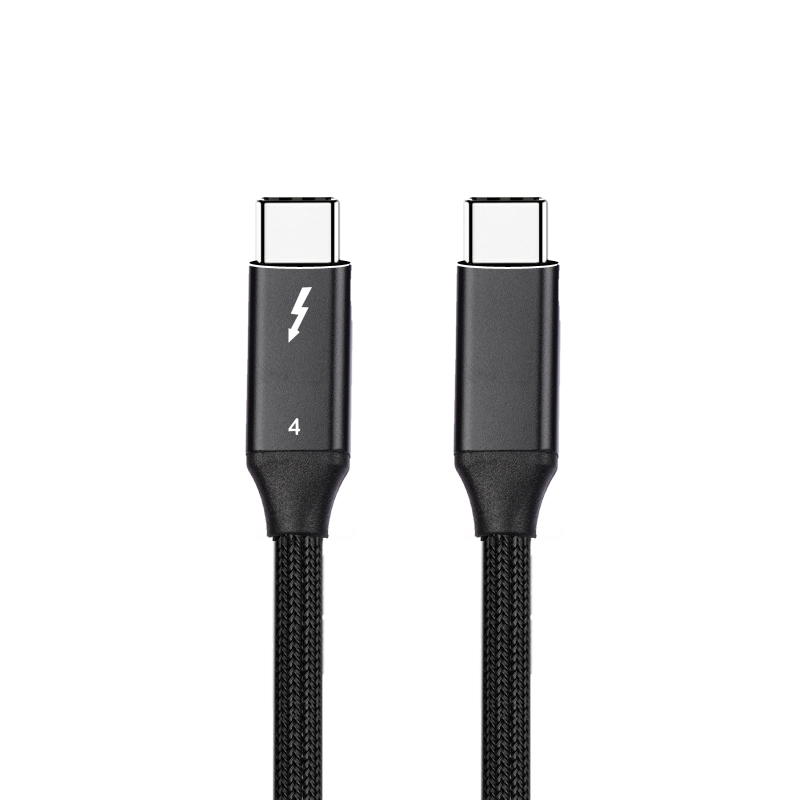
Various USB-C cable types for different device compatibility
Multiple USB-C cable variants showing the range of options available from Eilinks Electronics

Navigating USB-C Cable Compatibility in 2026

The USB-C ecosystem has grown exponentially since its introduction, and with that growth comes complexity. Not every USB-C cable works with every USB-C device. Understanding the compatibility matrix is crucial whether you are an IT manager standardizing enterprise equipment, a consumer upgrading home devices, or a procurement officer sourcing cables for manufacturing operations.

Eilinks Electronics has compiled this comprehensive compatibility guide based on our 15+ years of experience as a leading USB-C cable manufacturer. We have tested thousands of cable-device combinations to bring you accurate, practical guidance on what works and what does not.

The Core Compatibility Factors

USB-C cable compatibility depends on four primary factors: data speed rating, power delivery capability, protocol support (Thunderbolt/USB4), and physical construction quality. A cable may physically connect two devices while failing to deliver expected performance because one or more of these factors is mismatched.

Data Speed Tiers and Their Device Requirements

Speed Tier Datarate Protocol Name Use Case
USB 2.0 480 Mbps USB 2.0 Basic charging, keyboards, mice
USB 3.2 Gen 1 5 Gbps USB 3.2 Gen 1 External HDDs, basic SSDs
USB 3.2 Gen 2 10 Gbps USB 3.2 Gen 2 Fast SSDs, single 4K display
USB 3.2 Gen 2×2 20 Gbps USB 3.2 Gen 2×2 High-speed SSDs, dual display
USB4 / Thunderbolt 3/4 40 Gbps USB4, TB3/TB4 eGPU, RAID arrays, 8K video
USB4 v2 / Thunderbolt 5 80 Gbps USB4 v2, TB5 Next-gen workstation, AI hardware

The key principle: your USB-C cable must support at least the speed tier required by both connected devices. If either device or the cable operates at a lower tier, the entire connection drops to the lowest common denominator.

Power Delivery Compatibility Matrix

Power delivery (PD) negotiation determines how fast devices can charge through a USB-C cable. The USB Power Delivery (USB-PD) specification has evolved significantly:

  • USB PD 2.0 / 3.0: Up to 100W at 20V/5A (Standard Power Range)
  • USB-PD 3.1 (EPR): Up to 240W USB-C at 48V/5A (Extended Power Range)
  • PDPSS (Programmable Power Supply): Dynamic voltage adjustment between 15V and 48V

An EPR-capable USB-C cable can safely deliver 240W to compatible laptops, gaming workstations, and professional displays. However, using a non-EPR-rated cable at high power levels creates fire hazards due to undersized internal conductors. Always verify EPR certification markings when charging high-power devices.

EPR-certified 240W USB-C cable for high-power delivery
EPR-certified 240W USB-C cable by Eilinks Electronics supporting extended power range for modern laptops and workstations

Device Category Compatibility Guide

Laptops and Notebooks

Modern laptops from Apple, Dell, HP, Lenovo, and ASUS all feature USB-C ports with varying capabilities:

Device Category Recommended Cable Type Min Speed Min Power
MacBook Air M1/M2/M3 USB 3.2 Cable Gen 2 or USB4 10 Gbps 45W-70W
MacBook Pro 14″/16″ USB4 Cable or TB4 40 Gbps 96W-140W
Dell XPS / Precision Thunderbolt 4 cable preferred 40 Gbps 65W-130W
Gaming Laptops (ASUS ROG) EPR-rated cable (240W capable) 40 Gbps 150-240W
Ultrabooks (ThinkPad X1) USB 3.2 Cable Gen 2 10 Gbps 65W

Smartphones and Tablets

Most Android phones and tablets use USB-C for charging and data transfer. The vast majority require only USB 2.0 speeds and up to 18W-65W charging. However, premium smartphones increasingly support higher-speed data transfer protocols like USB 3.2 Gen 2 (10 Gbps) for direct PC backup and tethered photography workflows. A quality USB-C cable with eMarker ensures safe power negotiation regardless of phone model.

Displays and Monitors

USB-C monitors combine video input, data hub functionality, and laptop charging in a single connection. For 1080p/1440p displays, any USB 3.2 Cable with Alt Mode support works well. For 4K@60Hz+ displays, you need USB4 cable or Thunderbolt 4 cable bandwidth. Some 5K/6K professional displays (Apple Pro Display XDR, Dell UltraSharp) specifically require Thunderbolt 4 or higher.

Storage Devices and Docks

External NVMe SSDs routinely exceed 3000 MB/s sequential read/write rates. To achieve these speeds over USB-C, you absolutely need USB4 cable (40Gbps) or Thunderbolt 4 cable. Using a slower cable will bottleneck even the fastest drives to under 1050 MB/s (the theoretical max of 10 Gbps). Docking stations compound this requirement by aggregating multiple peripherals (displays, storage, networking, audio) through a single upstream USB-C cable.

Thunderbolt vs USB4 Cross-Compatibility

A common source of confusion is whether Thunderbolt devices work with USB-only hosts and vice versa. Here is the definitive cross-compatibility summary:

  • USB4 host + USB4 device: Full 40Gbps operation guaranteed
  • Thunderbolt 4 host + USB4 device: Works at full USB4 capability
  • USB4 host + Thunderbolt 4 device: Works if host supports TB tunneling (most do)
  • Thunderbolt 3 host + USB4 cable: Compatible at up to 40Gbps
  • USB-C (no TB) host + Thunderbolt device: Will NOT work for Thunderbolt functions

The safest approach for maximum compatibility across all devices is to choose a Thunderbolt 4 cable, which is backward-compatible with all previous standards while guaranteeing future readiness.

Cable Length Impact on Compatibility

Cable length directly affects which speed tiers remain functional. Signal attenuation increases exponentially with length, especially for high-frequency differential pairs used by USB 3.x, USB4, and Thunderbolt:

Max Length (Passive Cable) Speed Supported
Up to 0.8m (31 inches) Full 40 Gbps (USB4 / TB4)
Up to 1.0m (39 inches) Up to 20 Gbps (USB 3.2 Gen 2×2)
Up to 2.0m (78 inches) Up to 10 Gbps (USB 3.2 Gen 2)
Up to 3.0m (118 inches) Up to 5 Gbps (USB 3.2 Gen 1)
Any length (active/optical) Full rated speed maintained

At Eilinks Electronics, we offer active optical fiber USB-C cables for installations requiring longer runs while maintaining full USB4 cable or Thunderbolt 5 cable performance. Our optical cables maintain signal integrity up to 80 meters, making them ideal for studio environments where equipment may be rack-mounted away from the editing station.

Frequently Asked Questions

Will my old USB-C cable work with my new USB4 laptop?

It will physically connect and function for basic tasks (charging, USB 2.0 data), but it will not provide USB4-level performance. Your new laptop’s USB4 port will automatically downgrade to match the cable’s maximum speed. To get the 40Gbps performance you paid for, upgrade to a certified USB4 cable or Thunderbolt 4 cable.

How do I check my current USB-C cable’s capabilities?

The easiest method without specialized equipment: look for printed text on the cable housing near the connector. Legitimate manufacturers print the speed rating (“5Gbps”, “10Gbps”, “40Gbps”) and power rating (“60W”, “100W”, “240W”). If no text is visible, assume it is USB 2.0 / 60W maximum. For precise verification, tools like the Total Phase Advanced Cable Tester can read the eMarker chip data and report exact specifications.

Can I charge my 240W gaming laptop with a 100W USB-C cable?

Physically yes, but it will charge slowly or fail to charge at all during intensive usage. The laptop will detect via CC pin communication that the cable cannot handle >100W and limit current draw accordingly. More importantly, forcing 240W through a 100W-rated conductor creates significant heat buildup and potential fire risk. We strongly recommend using only EPR-certified 240W USB-C cables for high-power laptops.

Do iPhone and iPad USB-C cables differ from Android USB-C cables?

No, electrically they are identical USB-C connectors. However, iPhones and iPads typically operate at lower power levels (up to 27W for iPhone, up to 35W for iPad Pro), so almost any USB-C cable works fine. The main consideration for Apple users is choosing a cable with adequate shielding to prevent interference with wireless signals (WiFi, Bluetooth) that Apple devices manage concurrently. Eilinks Electronics produces MFi-compliant USB-C Lightning alternatives and standard USB-C cables optimized for Apple ecosystems.

Why do some USB-C cables not fit certain ports despite being the same shape?

This usually happens with protective cases that partially block the USB-C recess. Some ruggedized or industrial USB-C ports have deeper receptacles requiring longer plug inserts. In rare cases, counterfeit cables may be manufactured out-of-specification. All genuine Eilinks Electronics cables meet strict USB-IF mechanical tolerances and fit all compliant ports correctly. If you encounter fitment issues consistently, verify that neither the cable nor the port has physical damage.

Need Help Choosing the Right USB-C Cable?
Eilinks Electronics provides free technical consultation for cable selection. As a trusted USB-C cable manufacturer serving clients worldwide, we ensure perfect compatibility for your specific devices and applications.

Contact Us
View Products

USB-C Cable
USB4 Cable
Thunderbolt 4 Cable
USB 3.2 Cable
Thunderbolt 5 Cable
eadmin
eadmin

Related posts

2026-05-08

USB-C Cable for Drone and Robotics 2026: Lightweight High-Speed Data


Read more
2026-05-08

USB-C Cable for Data Center and Server Room 2026: High-Density Power and Data


Read more
2026-05-08

USB-C Cable Care and Maintenance Guide 2026: Extend Cable Lifespan


Read more

Leave a Reply Cancel reply

Your email address will not be published. Required fields are marked *

Navigation

  • About
  • Contact

Products

  • USB-C Adapter
  • Thunderbolt 5/4/3 Cable
  • Audio/video Adapter Cable
  • USB-C Cable

Contacts

+86 13242969135
Sales@eilinks.com
Chashan Town, Dongguan City, Guangdong , China
© Dongguan Eilinks Eletronics Co.,Ltd All Rights Reserved
  • Consent
  • Details
  • About Cookies

This website uses cookies

We use cookies to personalise content and ads, to provide social media features and to analyse our traffic. We also share information about your use of our site with our social media, advertising and analytics partners who may combine it with other information that you’ve provided to them or that they’ve collected from your use of their services.

Necessary

Necessary cookies help make a website usable by enabling basic functions like page navigation and access to secure areas of the website. The website cannot function properly without these cookies.

Analytics & Performance

Statistic cookies help website owners to understand how visitors interact with websites by collecting and reporting information anonymously.

Marketing

Marketing cookies are used to track visitors across websites. The intention is to display ads that are relevant and engaging for the individual user and thereby more valuable for publishers and third party advertisers.

Cookies are small text files that can be used by websites to make a user's experience more efficient.

The law states that we can store cookies on your device if they are strictly necessary for the operation of this site. For all other types of cookies we need your permission. This means that cookies which are categorized as necessary, are processed based on GDPR Art. 6 (1) (f). All other cookies, meaning those from the categories preferences and marketing, are processed based on GDPR Art. 6 (1) (a) GDPR.

This site uses different types of cookies. Some cookies are placed by third party services that appear on our pages.

You can at any time change or withdraw your consent from the Cookie Declaration on our website.

Learn more about who we are, how you can contact us and how we process personal data in our Privacy Policy.

Please state your consent ID and date when you contact us regarding your consent.

Deny Customize Allow selected Allow all