




USB-C to USB-B Cable: Device Checks for Printer Benches
A USB-C to USB-B cable carries a printer, a scanner, an audio interface or a bench instrument into a host that no longer offers a Type-A port, and it does that without a separate dongle. The two ends look unrelated, because one is a 24-contact reversible connector and the other is the square, keyed plug that has sat on the back of office equipment for two decades. Eilinks builds the assembly for benches where the instrument outlives the laptop driving it.
The rating is decided by the slower of the two standards, and that is where most enquiries go wrong. A Type-C host can present a 10 Gbps lane, while the device on the other end may only speak the older 480 Mbps signalling its connector was designed for. Settling where the cable sits among the wider set of USB-C cable types is worth doing before the order, because the connector pair sets the ceiling rather than the host.
What does a USB-C to USB-B cable actually change?
Nothing about the device changes. The instrument still enumerates as the same peripheral, still reports the same endpoints and still draws its power from the same 5 V rail it used before. What changes is the host-side connector and the way the cable has to declare itself, which is the part Eilinks draws first.
The Type-C end presents 24 contacts and a configuration channel, while a USB 2.0 Type-B plug carries 4 contacts and a USB 3.0 Type-B plug carries 9. The extra conductors on the Type-C side do not create bandwidth the far end cannot use.
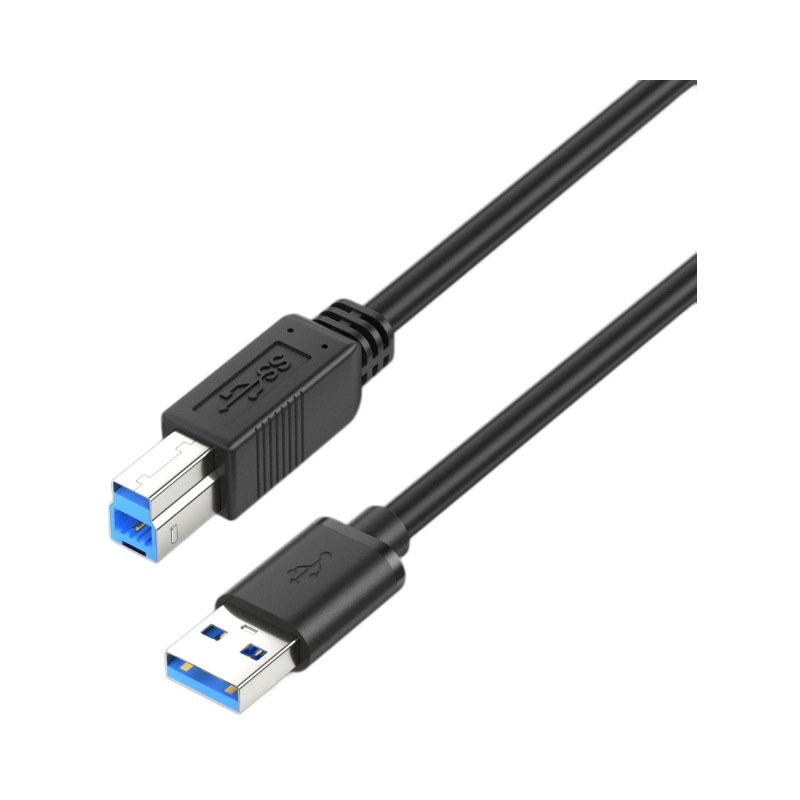
That mismatch is why a cable can charge a device at the full rate while transferring data at the slower figure. The power path and the data path are budgeted separately, and a USB-B device usually sets the data side.
USB-C to USB-B cable or an A-to-B cable with an adapter
The choice is easier to settle with a table than with an opinion. A USB-C to USB-B cable against an older A-to-B cable plus an adapter usually turns on three things: how many joins sit in the path, whether the assembly has to stay put, and how the cable is documented for the buyer.
| Point to check | USB-C to USB-B cable | A-to-B cable with adapter |
|---|---|---|
| Joins in the path | None | One extra interface |
| Host port needed | Type-C only | Type-A plus adapter |
| Length options | Made to the run | Fixed by the cable bought |
| Documentation | One drawing, one part | Two parts, two ratings |
A Chinese-made USB-C to USB-B cable is the version that removes the join, and it is the version where the length can be set to the bench rather than to a catalogue page.
Two figures set the ceiling on the data side. The USB 2.0 High-Speed rate of 480 Mbps is 60 MB/s before overhead, and the USB 3.0 SuperSpeed rate of 5 Gbps is 625 MB/s. A device built for the first figure cannot be lifted to the second by the host.
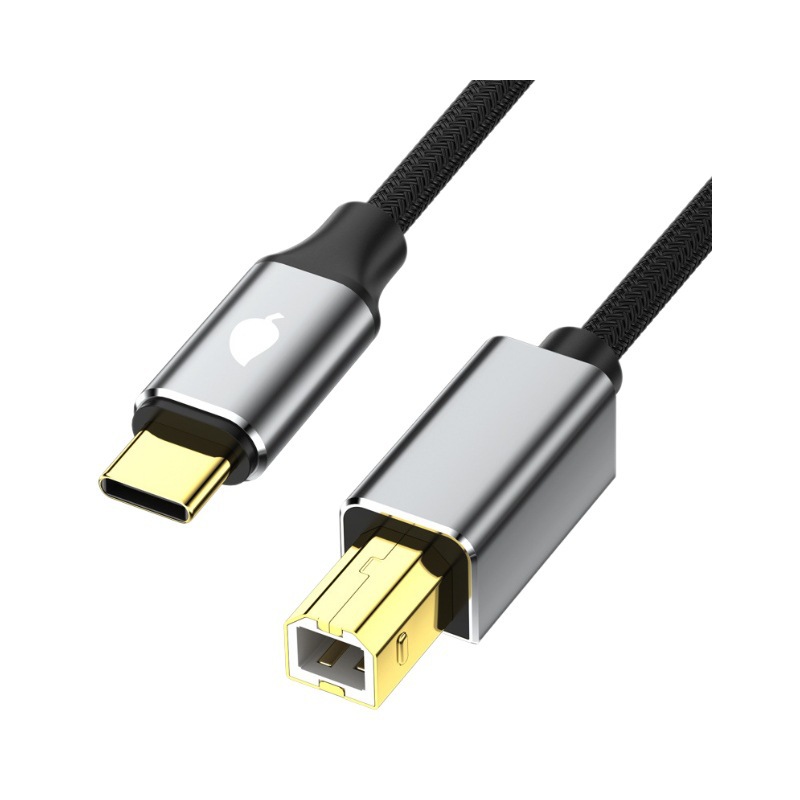
Why does a USB-B device negotiate a slower link?
The reason is the connector, not the driver. A USB 2.0 Type-B plug has no pins for the SuperSpeed pairs, so a device fitted with that socket can only negotiate the older signalling even when the host offers far more. A USB 3.0 Type-B plug adds the extra conductors, and only then does the faster link become possible.
Eilinks Eletronics sees the same pattern across printer, scanner and instrument classes: the device is capable, the connector is the limit, and the buyer has assumed the cable was the problem. The place to read the difference is how a power rating and a data rating differ on the same assembly.
Two field observations help separate the causes. A cable that fails only after a firmware update is usually a driver change rather than a cable fault, because the connector pair did not move; and a cable that drops out only when the instrument motor runs is usually a shield problem. Both are cheap to separate on site: try a second known cable, then move the run away from the noise source.
Where a USB-C to USB-B cable belongs on a bench
A USB-C to USB-B cable for a fixed instrument bench is the commonest ask, because the laptop on the bench changes every few years while the instrument does not. Keeping the cable in the run and the adapter out of it is what keeps the port count down, and Eilinks builds both ends of the assembly to one drawing.
| Check point | What to confirm | When it shows up |
|---|---|---|
| Connector class | Which Type-B socket the device has | First enumeration |
| Rate ceiling | Rate the device was built for | First large transfer |
| Shield path | Shield bonded at both ends | Under a nearby motor |
| Strain relief | Cable held, not hanging off the plug | After a season of service |
- Identify the Type-B socket on the device
- Confirm the rate the device was built for
- Confirm the shield is bonded at both ends
- Support the cable so the plug carries no load
Where the run leaves a panel or a trolley, a panel-mount USB-B cable turns the cable end into a socket that survives the equipment being swapped.
China USB-C to USB-B cable supplier checks
Three questions separate a manufacturer who can support a programme from one who only ships boxes. Which Type-B socket class was the assembly checked against? At what rate was the pair measured? And will the second batch match the approved sample?
A USB-C to USB-B cable manufacturer and a USB-C to USB-B cable factory in China are judged on the same three answers, and Dongguan Eilinks records them against the drawing because an assembly that behaves differently in the second batch is a site visit rather than a paperwork problem. A Chinese manufacturer of USB-C to USB-B cables also has to say which Type-B plug it will fit, because a USB 2.0 shell and a USB 3.0 shell look similar from the outside and do not behave alike.
The contact count and the shield path are what differ between those two parts, and neither is visible in a catalogue photo. That is why the drawing has to carry the connector class rather than the product title.
USB-C to USB-B cable checks before a batch order
USB-IF certification requirements for a USB-C to USB-B cable describe what the assembly has to be able to do, and CE marking requirements for a USB-C to USB-B cable sit with the finished product placed on the market. Neither document replaces a measurement on the device the cable will actually serve, and the quotation packs name that device rather than a generic figure.
The contact arrangement and the connector classes come from the USB 2.0 Specification published by usb.org, and that document is the reference to name when the enquiry goes out. A run that is specified against the wrong revision is the one that gets re-cut.
Length is the item that gets agreed last and argued about first. A USB 2.0 run is usually quoted at a 5 m ceiling, and the figure assumes a clean path with no extra joins; once the cable is dressed through a trolley or a cabinet door, the usable length shortens. Where a bench needs more than that, an active extension belongs in the path, and the drawing has to say so rather than leaving the length to be settled at the bench. Naming the device and the length on the same line is what keeps a repeat order from drifting.
- The bench owner confirms the device and its socket class
- The sourcing engineer confirms the rate to hold
- The chosen part is pinned to the plug class and the shield path
- The commissioning team confirms the rate after install
Choosing a USB-C to USB-B cable for an instrument run comes down to three recorded items: the socket class on the device, the rate the device was built for, and the length the bench needs. Where the run has to end in a panel, a SuperSpeed USB-B printer cable is the version that stays serviceable.
Questions buyers ask
Will a USB-C to USB-B cable make an old printer faster?
No. The rate is set by the socket on the device, and a USB 2.0 Type-B socket has no conductors for the SuperSpeed pairs. The cable carries the faster link only when the device itself offers it.
Can a USB-C to USB-B cable power the instrument?
It carries the 5 V the device expects, at the current the device declares, and no more. Instruments that need their own supply still need it, because the cable does not raise the current a host port is willing to give.
How long can a USB-C to USB-B cable be?
For USB 2.0 signalling the familiar limit is 5 m, and the practical length shortens once the run is dressed into a cabinet or a trolley. Where the bench needs more, an active extension belongs in the path rather than a longer passive cable.
What should appear on a USB-C to USB-B cable drawing?
The Type-B plug class, the Type-C plug form, the rate the pair has to hold, the length, and the device the assembly will serve. Those five items decide whether a repeat batch matches the approved sample.
Where the checks lead
Most USB-C to USB-B cable problems trace back to three points: the socket class on the device, the rate it was built for, and whether the run leaves the bench through a panel.
Send the device model, the socket class and the length to the Eilinks printer cable sample desk and the assembly can be matched to the bench rather than the bench being rebuilt around the cable.
