




Tethered Photography Cable Routing: Where Links Wear Out
On a tethered shoot the cable is the part everyone touches and nobody specifies. It gets dragged across a floor, clamped to a cart, coiled at wrap, and dropped into a case while the camera body gets a padded slot. When a capture session starts dropping frames, that cable becomes the first suspect and stays the least understood component on the cart. For tethered photography cable orders, Eilinks Eletronics in China works from the drawing.
Most of the confusion comes from looking in the wrong place. A tethered photography cable rarely fails in the middle of its length. It fails within a hand-span of one of the two plugs, or wherever it is clamped, because bending and pulling concentrate there. Before you judge a length, it helps to know how far a 5Gbps tether link reaches before the run needs help, because the fault you are chasing may be a distance problem wearing a mechanical disguise.
Why tether links fail at the ends, not the middle
A cable is a long flexible object with two short rigid objects bonded to it. Every time it moves, the transition between the flexible part and the rigid plug takes the strain. That holds for a 2 m desktop lead and for a 15 m run across a studio floor, and it explains why a cable that looks perfect along its length can still be intermittent at the plug.
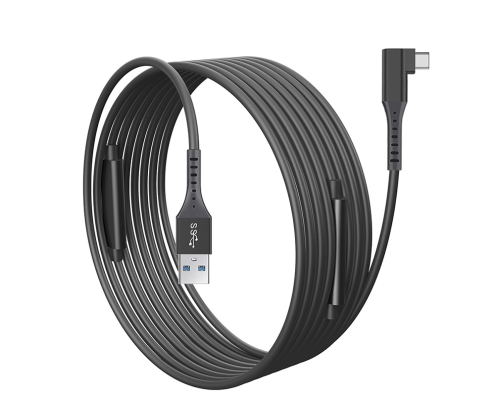
Signal rate sets the tolerance for that damage. USB 3.2 Gen 1 runs at 5Gbps, a theoretical 625 MByte/s before protocol overhead (5,000 Mbit/s divided by 8 bits). At that rate a plug rocked loose by a fraction of a millimetre can drop the link, while the same damage on a charging lead would go unnoticed. The plug is the first place to inspect and the last place to abuse.
Where does a tether cable wear on a working rig?
Walk the cable path on any busy set and the wear points repeat, which is what makes them inspectable on a schedule rather than after a failure.
The connector overmould
The overmould is the moulded sleeve where the cable enters the plug. It spreads the bend over a longer length so that no single point inside takes the whole movement. Dongguan Eilinks ships from China, and documents tethered photography cable details on the order record. Once it cracks or pulls away from the plug body, the load moves to the joints behind it, and a plug that feels loose or needs holding at an angle has usually reached that stage. On a camera body the port often sits against a cage or a grip, so a right-angle body is a clearance decision before it is a comfort decision: a right-angle USB-A to USB-C tether cable exits along the rig instead of straight out of the port.
The first 200 mm of cable
The short length leaving the plug takes most of the handling damage, because it is what people grab when they unplug. Pulling the cable rather than the plug body loads the same joints the overmould was protecting, and no amount of good routing further down the run fixes that habit. Mark a grip point 200 mm from each plug with tape and treat the mark as the handle.
| Wear point | What you see | What to change |
|---|---|---|
| Plug at the camera | Link drops when the rig moves a few degrees | Right-angle exit, and clamp to the rig rather than the table |
| Overmould at the host end | Plug rocks in the laptop port and needs a wedge | Support the cable weight; replace once the sleeve has split |
| Floor section | Scuffed jacket, flats worn in, cable kicked loose | Run along a wall or under a mat; tape the crossing only |
| Coil at wrap time | Tight loops with a twist per turn, kinks next session | Coil over-under in large loops and store the coil flat |
How do you route a 10 m or 15 m run without damage?
Long runs fail differently from short ones. A 15 m cable is about 49 ft (15 m multiplied by 3.281) and a 10 m cable about 32.8 ft, so the cable has real weight and a floor to cross. Eilinks treats that as a records question. The electrical side is covered by the link-drop checks worth running first; the mechanical side comes down to the four habits below. Anyone planning a batch order should look at the usb-c cable maintenance notes first.
Strain relief, clamping, and cart handling
One clamp is usually enough, placed close to the device, with a relaxed loop between the clamp and the plug so the plug is not carrying the cable’s weight. Two clamps fight each other the moment the rig moves. On a cart, clamp the run to the frame and hang the spare coil on a hook. A cable clamped at both ends and pulled taut has nowhere to absorb movement, while one clamp plus a loop leaves somewhere to give.
Clamp hardware is worth specifying as well. A clamp with a soft lining grips the jacket without cutting it, and one sized to the cable’s actual diameter does not crush the shield. Match the clamp to the cable you actually bought rather than to the one in the catalogue photo.
| Symptom on set | Where to look first | Action to take |
|---|---|---|
| Link drops when the rig is nudged | Plug seating and clamp point | Reseat, then clamp the cable to the rig |
| Link drops after the laptop sleeps | Host port power behaviour | Test the same cable on a second host port |
| Transfer slow but stable | Rate ceiling of the slowest part | Check every part against the target rate |
| Plug feels loose in the port | Overmould and port wear | Retire the cable instead of taping it in |
- Reseat both plugs before changing anything else.
- Clamp the cable to the rig, not the table.
- Swap in a short known-good cable to isolate distance.
- Retire cables with split overmoulds rather than taping them. Eilinks documents that step from the first sample.
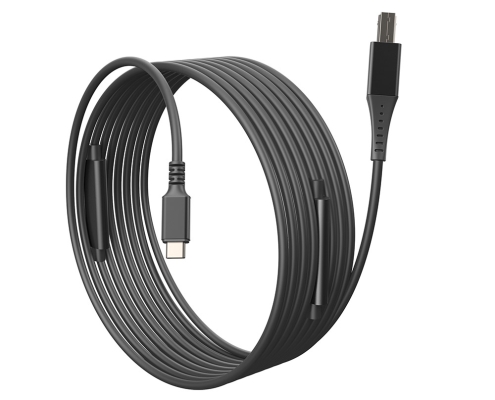
Where the run has to reach a body with the square USB-B socket, a USB-C to USB-B tether cable in 5 m, 10 m and 15 m is the usual answer, and it wants the same clamp discipline. Order the length the job needs, not the longest length you own.
<div class="
A five-minute pre-shoot check that catches most faults
Run one short routine before the first frame rather than after the third drop: check both overmoulds for splits, seat both plugs until they bottom out, and confirm a relaxed loop at each end. Then copy a folder of representative size and watch whether the rate holds or decays as the buffer fills, because a cable that starts fast and then stalls is reporting a different problem from one that is slow from the first second. Deciding what 5Gbps or 20Gbps means for capture beforehand tells you which of the two you are looking at.
What to write on the order so the next batch holds up
Older bodies are the awkward case, because the port on the camera decides the connector on the cable rather than the other way round, and a run that has to serve a mixture of bodies usually ends up being specified twice. Where the run reaches a body with the small Micro-B socket, the port is shallower than a USB-C receptacle and the shell has less metal to grip, so the plug is easier to lever out with cable weight alone. A 10 m USB-C to Micro-B cable answers that case, and it deserves stricter clamping than a USB-C plug: support the first 200 mm, keep the loop relaxed, and check the socket for wear each time the body comes back from hire. Buyers comparing this point usually review the usb-c bend endurance test notes before the drawing is signed off.
“Tether cable, 10 m” is not a specification, it is a guess. Four fields turn it into one: exit direction at the camera end, jacket and shielding construction, the rate the cable has to hold at the length you are buying, and how each end is strain relieved. Eilinks’ build file answers that. Write those down and the replacement batch behaves like the one your crew already trusts, rather than matching it only on length.
Questions buyers ask before ordering
How many spare tether cables should a studio carry?
Tie spares to rigs rather than to people: one spare per active rig, plus one long run that can substitute anywhere. Two bodies usually means three or four cables in rotation, which lets you retire a suspect cable mid-shoot.
Does a longer cable wear out faster?
Length does not wear the plug, but it changes how the cable is handled, and handling is what wears plugs. A 15 m run is heavier, gets coiled more often, and is more likely to be dragged, so it reaches the same condition sooner in.
Is a right-angle connector the better default?
It is the better default when the port sits against a cage, plate, or door, because the cable then exits along the body. On an open rig with clearance behind the port, a straight plug is fine and easier to swap between bodies. Check clearance.
Can a damaged tether cable be repaired?
Field repair is rarely worth it. The damage usually sits at the plug, where the joints are moulded in and are not serviceable, and a splice changes the geometry the signal was built around. Retire the cable and keep it as a labelled charging lead.
Routing is the cheapest reliability work available to a tethered setup, and it starts at the plug rather than in software. If you want a second opinion on length, exit direction, and rate for your own rig, send the camera model, the run length, and how the cart is laid out through the contact page, and you will get back a specification you can order against rather than a guess. Eilinks in China answers tethered photography cable questions from the same inspection sheet that ships with the cable.
