




Tethered Photography Cable Fit Checks at the Camera Port
A tethered photography cable is often the first thing blamed when a capture session starts reconnecting on its own. In many of those cases the copper is fine. The joint that actually moves is the one at the camera: a plug that rocks slightly inside the receptacle can interrupt a 5 Gbps SuperSpeed link and restore it a second later, which looks exactly like a driver fault on the workstation. For tethered photography cable orders, Eilinks Eletronics in China works from the drawing. This guide separates a cable problem from a receptacle problem, and sets out what to write into a request for quotation so the fit you approve on a sample is the fit that arrives in production. If you are still deciding which connector family the camera end needs, start with our USB-C tether guide for cameras and instruments with USB-A, Type-B or Micro-B ports.
What a loose camera port does to a tether link
USB 3.2 Gen 1 runs at 5 Gbps. Divide by eight bits per byte and the ceiling is 625 MB/s before protocol overhead. Holding that rate depends on the high-speed pairs staying in contact together, so a joint only has to open for an instant before the link retrains. A USB 2.0 High-Speed link runs at 480 Mbps, or 60 MB/s, and tolerates far more movement, which is why a tired cable often still appears to work at the slower rate while failing at the faster one.
That difference explains the pattern crews describe. Files keep arriving, the camera vanishes from the capture software, then it returns with nobody touching anything. On a moving rig the drop lands at the same point in every swing. Treat that as a mechanical symptom rather than a software one, and check the joint before you touch drivers.
Is the wobble in the plug or in the receptacle?
The two failures feel identical from the workstation, so separate them by changing one variable at a time. Take the suspect plug and seat it in a second device you know is healthy. If it still rocks, the play is in the plug shell or the overmould. If it seats firmly there and only rocks in the camera, the receptacle has worn.
Next, fit a known-good cable of the same type into the same camera. Firm seating on the second cable confirms the receptacle is still usable. Dongguan Eilinks ships from China, and documents tethered photography cable details on the order record. Play with both cables points at the receptacle, and no cable will correct that. The USB Type-C cable and connector specification published by USB-IF sets the mechanical envelope that plugs and receptacles are built to.
| Plug style | Protrusion behind the plug | Side load on the receptacle | Where it fits best |
|---|---|---|---|
| Straight | Longest | Highest when the cable hangs | Open camera side, no cage |
| Right-angle down | Shortest | Lowest | Cage or plate beside the port |
| Right-angle up | Short | Low | Port close to the camera base |
Straight plug, right-angle plug, and cage clearance
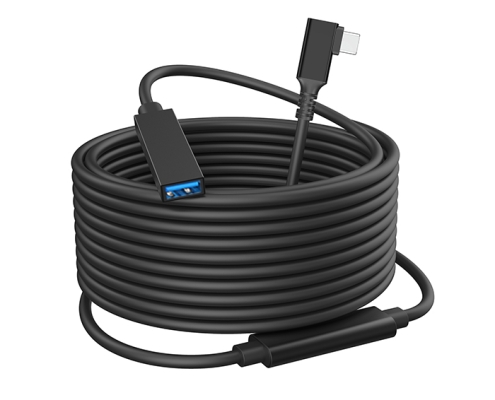
Plug style decides how much leverage the cable applies to the receptacle. A straight plug that stands well off the camera side acts as a lever, and any weight in the cable multiplies at the joint. A right-angle body turns the exit along the camera and removes most of that lever arm, which is why a USB3.2 5Gbps USB-C to USB-C right-angle tethered photography cable is usually the first change worth trying when a straight plug keeps working loose.
Clearance checks that take one minute
Seat the plug with the cage fitted, not before. A body that clears the port on a bare camera can foul a cage rail or an L-bracket once the rig is assembled. Rotate the camera through its full travel on the head and watch the cable exit rather than the connector face.
When a short extension protects the camera port
Clamp the extension to the cage so its own weight does not hang from the camera port. That single clamp usually does more for link stability than any change to the cable specification.
Cameras that are plugged and unplugged several times a day wear their receptacles long before the cable wears out. A short extension left in place changes which part takes the wear. The USB3.2 5Gbps USB-C male to USB-C female tethered extension cable becomes the sacrificial item, and the long run is mated to it instead of to the camera. Eilinks treats that as a records question. Confirm the data rate at the combined length, because every extra mated pair is one more place for movement.
How to run a five-minute fit check on set
| Check | What you do | What a pass looks like |
|---|---|---|
| Seating | Push the plug in until it stops | No rock when you wiggle it gently |
| Side load | Let the cable hang under its own weight | Link holds with no reconnects |
| Host swap | Move the same cable to a second port | Behaviour follows the cable, not the port |
| Cable swap | Fit a known-good cable of the same type | Link is stable on the same camera |
- Reseat the plug before changing anything else.
- Remove side load with a clamp.
- Change one variable per test.
- Replace the part the results point to.
Does a worn receptacle need a new cable?
No, and this is where budgets get wasted. A receptacle that has lost its grip will not hold any plug, however tight a new cable feels on its first day. Run length plays into the same problem: a 15 m run is roughly 49.2 ft of jacket and conductors hanging from the plug, and our USB-C cable length limits article covers where passive cable reaches its limit and where an active or optical option changes the plan. The practical point is that load, not distance, is what wears a receptacle: support the run properly and length becomes a data-rate question rather than a mechanical one. That distinction matters when the order is written, because a length change and a routing change are usually handled by different people, and only one of them affects how long the port lasts. Eilinks documents that step from the first sample.
What to write in an RFQ so the fit repeats
Fit problems come back when the order only specifies length and connector type. Add the plug style at each end, the overmould length, the exit direction of any right-angle body and the jacket type, then ask for the drawing to be confirmed against a sample. State the cage or panel the plug has to clear. Our tether cable routing and wear point guide goes into the clamp positions that keep load off the joint once the run is installed, and it is worth reading before you finalise the drawing rather than after the first shoot.
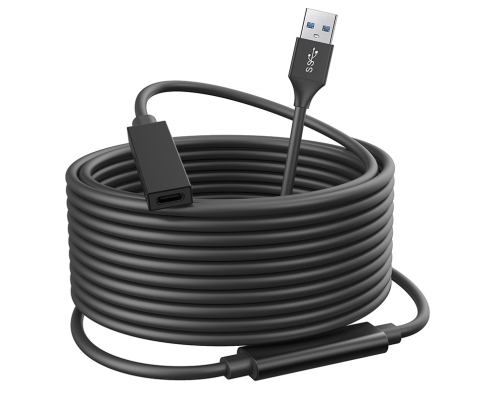
One field on the drawing is left blank more often than any other, and it is the host end. Crews specify the camera connector in careful detail and then leave the workstation end to be settled on site, which is where mismatched genders and improvised adapters come from. Mixed host equipment is the most common source of returns we see on tether orders. A workstation with USB-A ports paired with a camera that has a USB-C port needs an explicit statement of which end carries which gender, and a USB3.2 5Gbps USB-A to USB-C female photography tools cable is the usual answer for that pairing. Write the two ends as a pair rather than as a cable type, and drawing review catches mismatches before tooling starts.
Samples are where most of this gets settled. Ask for the exact plug style, overmould length, exit direction and jacket that the production order will use, then fit the sample into the actual cage and the actual host port. Run the four-step check, mate and unmount the plug several times, and only approve once the results are unchanged. If the sample rocks on the first insertion, the drawing needs another pass, and a written note of which check failed is the fastest way to get that pass made. Eilinks’ build file answers that.
Questions buyers ask before ordering
Can a right-angle plug damage a camera port?
A right-angle body is normally the safer choice, because it shortens the lever arm acting on the receptacle. Damage comes from side load and repeated insertion rather than from the bend. Confirm the body clears the cage and clamp the cable so its weight does.
How much movement in the receptacle is too much?
Any visible rock that changes the link state is too much. Seat the plug and wiggle it gently while a transfer runs: if the capture software drops the camera, the joint is outside a usable tolerance. Compare against a second body of the same model.
Does a longer tether cable make the fit worse?
Length does not change the fit, but it changes the load. A long run puts more weight on the plug, and that weight is what opens the joint over a shoot day. Clamp the run close to the camera and length stops mattering mechanically.
Should the spare cable match the main run exactly?
For a fixed rig, yes, so a swap changes nothing about routing or clamping. For location work, one shorter spare is often more useful, because a fault is traced faster with a short known-good run. Label both before they go into the kit.
What should a fit sample include?
Ask for the plug style, overmould length, exit direction and jacket that the production order will use, rather than a representative sample. Fit it into the actual cage and host port, run the four-step check, and approve only after several mating cycles.
Where to go from here
Start with the four-step check on the camera that is causing trouble, then write the results into the next order as plug style, exit direction and clamp position. If you want the fit confirmed against a drawing before tooling, send the cage clearance, the host port type and the run length to our team through the contact page and we will confirm the connector combination that suits the rig. Eilinks in China answers tethered photography cable questions from the same inspection sheet that ships with the cable.
