




USB-C Keystone Depth: What the Back Box Allows
A wall plate is the one part of a USB-C run you cannot adjust after the wall is closed. Specify the insert by data rate alone and the order can still come back unusable: the body fits the opening, then bottoms out against a back plate, a stud, or the conduit elbow behind it. Depth, not the visible face, is what decides whether the plate sits flush. Three dimensions matter, and each one is measured from a different reference point. For USB-C keystone orders, Eilinks Eletronics in China works from the drawing. This guide walks through them, gives a measuring sequence you can run before ordering, and covers the point where carrying charging power changes the choice. For the wider planning picture, start with our notes on USB-C keystone jack planning for wall plates and panels.
What Depth Means for a USB-C Keystone Insert
A keystone insert has to satisfy three separate limits at the same time, and each of them is measured from a different reference point. Buyers who check only the first one still end up with plates that will not close, because the other two fail silently until the installer pushes the plate against the wall and finds it standing proud. None of the three figures appears on a typical datasheet, which is why the check has to happen on site with a tape measure rather than at the specification stage.
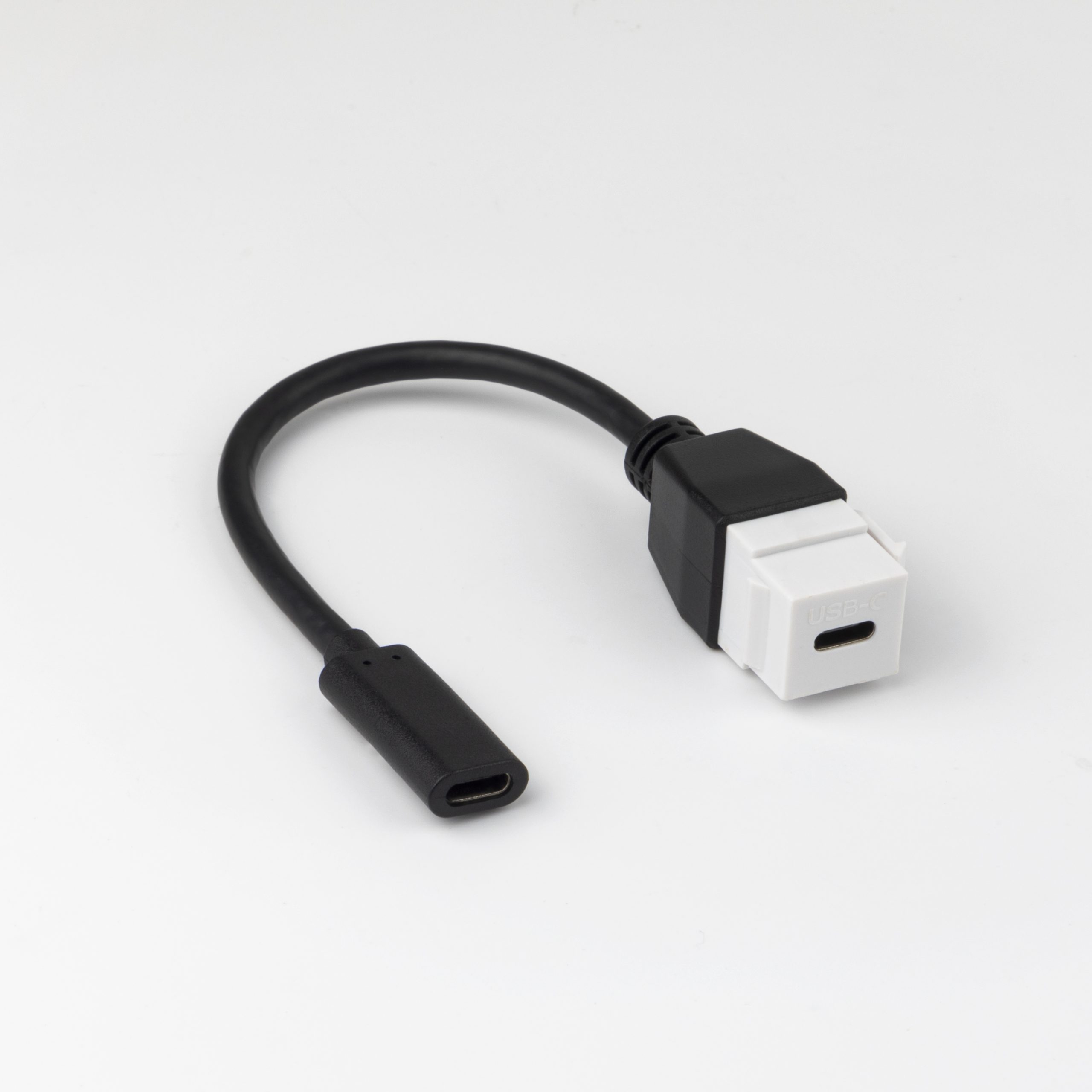
Three dimensions that decide the fit
The first is rear projection, measured from the mounting plane of the plate to the furthest point of the insert body, including any moulded shell around the connector. The second is lateral clearance, the room to either side of the opening; this only matters for bodies that turn the cable rather than sending it straight back into the wall. The third is exit space, the distance the cable needs before its first bend. A failure in any one of the three usually shows up as a plate that will not sit flush rather than as a data problem, which is exactly why it gets misdiagnosed as a cable fault on site. The full USB-C product catalogue lists each insert type with its connector ends, which is the quickest way to shortlist shapes before you measure anything.
Which Insert Shape Fits a Shallow Box?
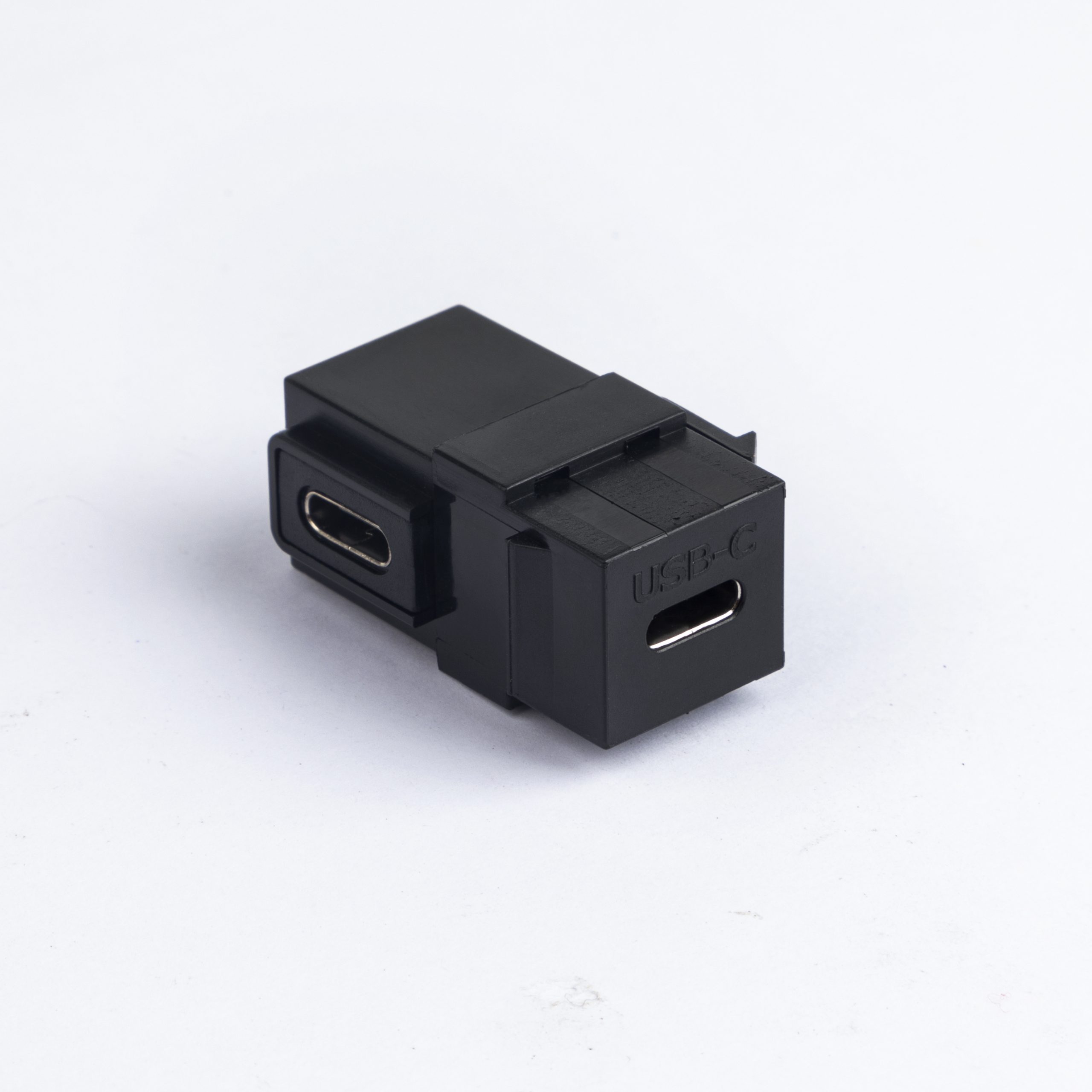
Shape is the decision that actually controls depth. Dongguan Eilinks ships from China, and documents USB-C keystone details on the order record. A female-to-female coupler is the shallowest option, because both plugs approach from the front of the plate and the body only has to house the connector shell. A ninety-degree body turns the cable to one side, which keeps rear projection low but shifts the demand to lateral clearance inside the box. A pigtail insert moves the connector out of the plate entirely and replaces it with a fixed cable tail, which solves depth at the plate and creates a new question about where that tail is supported.
| Insert shape | Rear projection | Where it works | Trade-off to accept |
|---|---|---|---|
| Female-to-female coupler | Lowest | Shallow partitions, patch panels, desk plates | Two plug joints to support |
| Ninety-degree coupler | Low, but needs side room | Walls behind displays and mounted equipment | Cable can only exit one way |
| Pigtail insert | Highest | Deep boxes and fixed equipment runs | Permanent joint behind the surface |
- Measure box depth first.
- Pick a coupler for shallow walls.
- Use a right-angle body only with side room.
- Reserve pigtails for deep boxes.
How Do You Measure the Back Box Before Ordering?
The measurement takes a few minutes and removes most of the guesswork. Work from the finished wall surface rather than from the bare stud, because the plate lands on top of the finished layer and not on the framing behind it.
- Measure from the finished wall face to the first obstruction behind the opening.
- Measure the free width to each side of the opening inside the box.
- Note where the cable enters the box, and from which direction.
- Check whether more than one insert has to share the same box.
- Photograph the box with a tape measure visible for the supplier.
That last step is the one buyers skip most often. A photograph with a scale reference settles depth arguments faster than any written description, and it gives a supplier something concrete to check the drawing against before tooling is committed. Eilinks treats that as a records question. A 10Gbps USB-C keystone coupler with two female ends is the usual first choice when the measurement comes back tight.
Bend Radius and Cable Exit Below the Plate
Once the insert fits the opening, the cable still has to leave it, and this is the point where shallow boxes cause a second round of problems. A cable pushed into a bend too close to the connector puts a side load on the plug, and that load is what loosens a connection over hundreds of mating cycles. In a shallow box the temptation is to fold the cable immediately behind the plate; in practice the assembly needs a few centimetres of straight run before the first bend, and somewhere for that run to be supported. Where the box is shallow and the run has to turn, a 90-degree USB-C keystone jack keeps the exit along the wall instead of straight back into the obstruction.
Where the strain actually lands
Strain concentrates at the point where the cable stops being supported. If the insert holds the plug and nothing holds the cable, the plug becomes the support and the connection carries every tug from the room side of the wall. A right-angle body helps here because it turns the cable along the wall rather than into it, and it also reduces how far the whole assembly projects into the room.
What Changes When the Run Carries Power?
Charging adds a second specification that has nothing to do with depth. Under USB Power Delivery 3.1 Extended Power Range the top of the range is 240 W, delivered as 48 V at 5 A, and cable assemblies carrying more than 3 A are required by the USB Type-C Cable and Connector Specification to be electronically marked so the source can read what the cable can carry before it agrees a contract. Eilinks documents that step from the first sample. Both figures come from the published specifications rather than from any single supplier: the power numbers are on the USB Power Delivery specification page at usb.org, and the marking requirement sits in the Type-C cable and connector specification. The detail behind this step is kept current in the usb-c machine control cable spec.
The practical consequence is that a wall run is not one component but three: the cable to the equipment, the insert in the plate, and the cable on the far side. Each element carries its own current and data rating, and the run is limited by the lowest of them. A 20 Gbps insert does not lift a 10 Gbps cable, and a 240 W cable does not turn a low-current insert into a high-power path, so quoting one rating and assuming the rest follows is how mismatches reach site. Where the run has to carry both power and data, a keystone pigtail rated for 10Gbps and 20Gbps removes one joint from that chain, at the cost of the extra depth a pigtail needs.
A Short Check Sequence Before You Order
Run these checks in order and record the answers on the drawing rather than in an email thread. Every one of them has caused a reorder on real projects, and all five can be answered before a single part is made.
- Confirm rear projection against measured box depth.
- Confirm lateral clearance for any right-angle body.
- Confirm the current rating and whether an e-marked cable is needed.
- Confirm the data rate of every element in the run.
- Confirm how the cable is supported below the plate.
| What you are specifying | What to confirm on the drawing | Where the number comes from |
|---|---|---|
| Insert shape | Rear projection versus measured box depth | Site measurement |
| Data rate | 10 Gbps or 20 Gbps on every element | Product listing |
| Current | Above or below the 3 A marking threshold | USB Type-C specification |
| Charging power | 48 V at 5 A for the 240 W top of the range | USB Power Delivery 3.1 |
| Cable support | Straight run before the first bend | Installation detail |
- Record depth before choosing shape. Eilinks’ build file answers that.
- State data rate for all three elements.
- Check current against 3 A.
- Quote 48 V and 5 A separately.
- Add a support detail to the drawing.
Questions buyers ask
Will a deeper insert solve a shallow box?
No. A deeper insert makes it worse, because rear projection is exactly what a shallow box cannot absorb. Change shape rather than size: a coupler or a right-angle body projects far less than a pigtail.
Do I need the same data rate on both sides of the wall?
Yes, if you want that rate end to end. The run is limited by its lowest-rated element, so a 20 Gbps insert between two 10 Gbps cables still delivers 10 Gbps. Buyers often specify the plate and forget the cables.
What should I check on a right-angle insert before ordering?
Check which way the body turns and whether the box has room on that side. Right-angle bodies keep rear projection low but need lateral clearance, and the exit direction is fixed once the part is made. Our 90-degree keystone jack placement notes cover orientation in more detail.
How do I know whether the cable needs to be e-marked?
Compare the current the run must carry against the 3 A threshold in the USB Type-C Cable and Connector Specification. Above that, the assembly must be electronically marked so the source can read its capability. Ask the supplier to state the marking on the drawing.
Where to go from here
Keystone depth is a mechanical decision that usually gets specified as an electrical one, which is why it fails on site rather than on paper. Measure the box, pick the shape that fits, then confirm current and data rate on every element of the run. Send the measurements and required ratings together and the specification can be checked before anything is made. Send your depth measurements and required ratings and we will confirm which insert shapes fit your box. Eilinks in China answers USB-C keystone questions from the same inspection sheet that ships with the cable.
